Setting up a home office isn’t just about finding desk space and plugging in a monitor. The chair you’re sitting in for 40+ hours a week determines whether you end each day with energy or a stiff neck and aching shoulders. An ergonomic office chair with a headrest isn’t a luxury, it’s a piece of functional equipment that supports your cervical spine, reduces upper body tension, and keeps you productive without the back pain. Whether you’re converting a spare bedroom into a workspace or upgrading a cramped corner setup, choosing the right chair means understanding what actually supports your body, not just what looks good in a catalog photo.
Table of Contents
ToggleKey Takeaways
- An ergonomic office chair with a headrest supports your cervical spine and reduces upper body tension by properly managing the weight of your head (10-12 pounds) throughout the workday.
- Adjustable headrests should tilt forward and backward at least 30 degrees and slide up or down 2-3 inches to accommodate individual body differences and maintain neutral neck positioning.
- Lumbar support, proper seat depth (15.5-17.5 inches), and 4D-adjustable armrests are essential system components that work together with the headrest to prevent pain and maintain spinal alignment.
- Proper chair setup requires 15-20 minutes of adjustment including seat height, lumbar positioning, armrest alignment, and headrest angle—and should be revisited every few months as your posture improves.
- Quality ergonomic chairs with headrests and full adjustability are available at affordable price points ($250-$450) without sacrificing the support needed for long-term workplace comfort and health.
Why a Headrest Matters for Your Home Office Setup
A headrest does more than give you somewhere to lean back during a phone call. It provides crucial support for the cervical vertebrae, the seven bones in your neck that carry the weight of your head, which averages 10-12 pounds. Without proper support, that weight pulls forward when you’re looking at a screen, creating strain that radiates down into your shoulders and upper back.
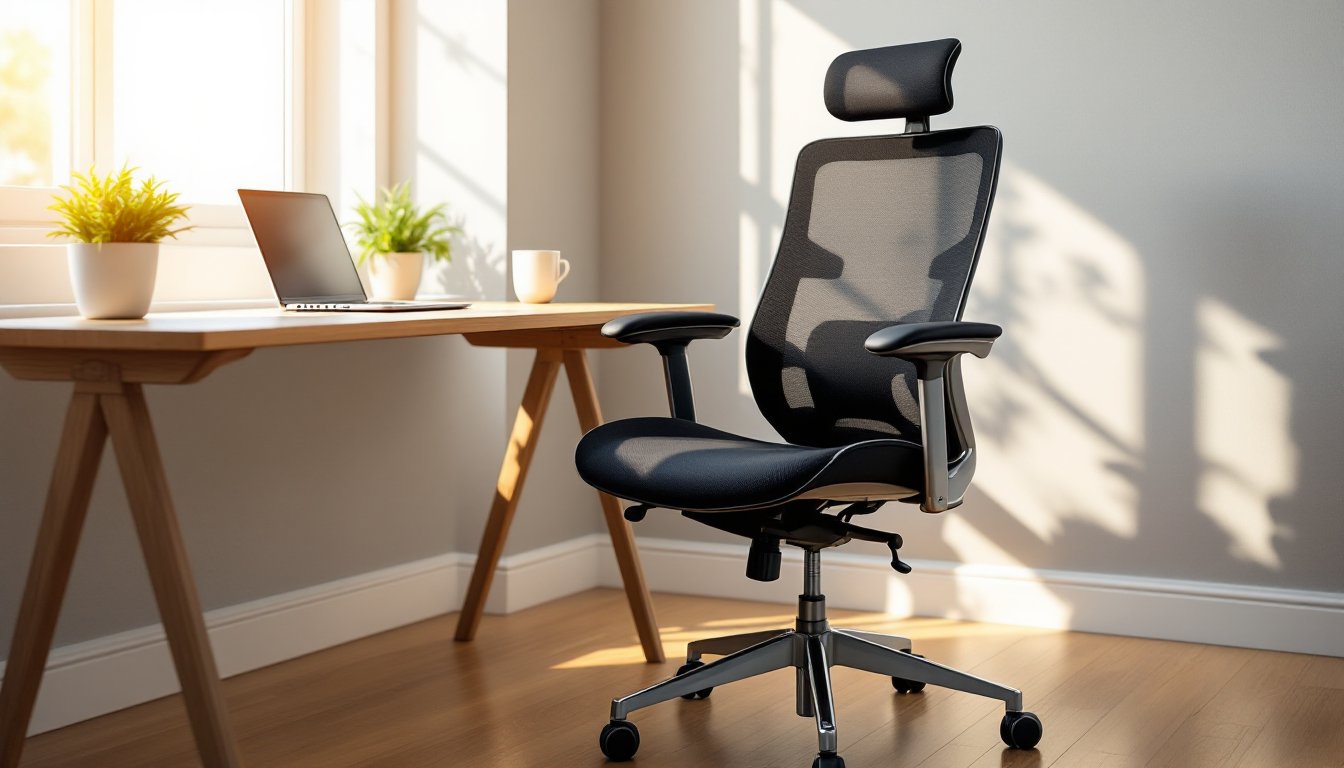
Adjustable headrests let you position support exactly where your neck meets your skull. This matters because everyone’s torso length and sitting height differ. A fixed headrest might hit mid-skull for one person and upper shoulders for another. Look for headrests that tilt forward and backward (at least 30 degrees of adjustment) and slide up or down at least 2-3 inches.
Headrests also change how you use your chair throughout the day. When you lean back to think through a problem or take a break from screen work, the headrest keeps your neck in a neutral position instead of hyperextending. This reduces muscle fatigue in the sternocleidomastoid and trapezius muscles, the ones that get rock-hard after a long day hunched over a keyboard.
For anyone dealing with existing neck issues, herniated discs, or tension headaches, a headrest isn’t optional. It’s a load-bearing component that takes pressure off inflamed tissues. Pair it with a chair that reclines to at least 120 degrees, and you’ve got a setup that lets you shift positions without losing spinal alignment.
Key Ergonomic Features to Look for Beyond the Headrest
A headrest alone won’t save you if the rest of the chair is built like a waiting room seat. Ergonomic design is a system, every adjustable component works together to fit the chair to your body, not the other way around.
Adjustable Lumbar Support and Seat Depth
Lumbar support addresses the natural inward curve of your lower spine (the lordotic curve). Chairs without it flatten that curve, which loads stress onto your spinal discs and the muscles along your vertebrae. Look for lumbar mechanisms that adjust in two directions: height (to match where your curve sits, usually between L3 and L5 vertebrae) and depth (how far the support pushes into your back).
Some chairs use a simple dial or paddle that inflates a bladder behind the backrest. Others have a rigid plastic frame you slide up and down. Both work, what matters is that you can feel firm, consistent pressure in your lower back without the support digging into your sacrum or mid-back.
Seat depth is the distance from the front edge of the seat to the backrest. If it’s too long, the seat edge digs into the back of your knees, cutting off circulation and causing numbness. Too short, and your thighs aren’t supported, putting extra load on your lower back. A good range is 15.5 to 17.5 inches for most adults. Chairs with seat-depth adjustment (usually a lever under the front of the seat) let you dial this in so there’s about 2-3 inches of clearance between the seat edge and the back of your knee.
Armrest Configuration and Material Quality
Armrests keep your shoulders relaxed by supporting the weight of your arms, about 10% of your total body weight. When your arms hang unsupported or you hunch forward to rest them on a desk, your trapezius and levator scapulae muscles stay contracted, leading to shoulder and neck pain.
Look for 4D-adjustable armrests: height, width, depth (forward/backward), and angle (pivot). Height adjustment is non-negotiable, your elbows should rest at a 90-degree angle with your shoulders relaxed. Width adjustment matters if you’re broad-shouldered or narrow-framed: armrests that are too far apart force your arms outward, while ones too close make you scrunch inward.
Material quality shows up fast. Hard plastic armrests bruise your elbows after a few hours. Polyurethane foam caps wear better and distribute pressure. Some higher-end chairs use gel-infused padding or soft-touch coatings that hold up under daily use. Avoid chairs where the armrest padding is glued on, it’ll peel off within a year.
How to Choose the Right Ergonomic Chair for Your Space
Choosing a chair starts with honest measurements, both of your body and your workspace. Grab a tape measure and note your desk height, the clearance under your desk, and the floor-to-seat height range you need.
Most office desks sit at 28-30 inches from the floor. Your chair’s seat height should adjust so your feet rest flat on the floor (or a footrest) with your thighs parallel to the ground and your knees at about 90 degrees. For reference, that’s usually a seat height range of 16-21 inches for adults between 5’0″ and 6’2″. Taller or shorter? You’ll need a chair with an extended range or a footrest to make up the difference.
Check the chair base diameter. Most ergonomic chairs have a five-point star base that’s 24-28 inches across. Make sure it fits under your desk without banging into the legs or pedestal. If you’re working in a tight corner or a closet-converted-office, measure twice.
Weight capacity matters more than marketing suggests. Chairs rated for 250 pounds use thinner gauge steel and smaller gas cylinders than those rated for 300-350 pounds. If you’re near the capacity limit, the chair will sag faster and adjustments will drift. Many models tested by leading consumer reviews highlight the difference in long-term durability between standard and heavy-duty builds.
Material choices: Mesh backs breathe better and don’t trap heat, which matters if you run warm or live somewhere without AC. Upholstered backs (fabric or leatherette) offer more cushion but can get sticky in summer. Leather and leatherette look sharp but require maintenance and can crack if you don’t treat them.
Budget plays a role, but ergonomic chairs have come down in price. You don’t need a $1,200 task chair to get real support. Several affordable ergonomic options with headrests and full adjustability are available in the $250-$450 range, especially if you shop during sales or buy refurbished from office liquidation suppliers.
Don’t skip the test sit. If you’re buying online, make sure the return policy covers shipping both ways. Even with perfect specs on paper, a chair that doesn’t fit your build or feel comfortable in the first week won’t magically get better after a month.
Setting Up Your Chair for Maximum Ergonomic Benefit
Unboxing your new chair and plopping down with factory settings is like buying a miter saw and never adjusting the bevel. Ergonomic chairs require setup, budget 15-20 minutes to dial everything in.
Start with seat height. Sit all the way back with your feet flat on the floor. Your thighs should be parallel to the ground or angled slightly downward (a 5-10 degree slope is fine). If your knees are higher than your hips, raise the seat. If your feet dangle, lower it or add a footrest.
Next, adjust seat depth. Slide the seat pan forward or backward until there’s about two to three fingers’ width of space between the front edge of the seat and the back of your knees. Too much gap and you lose thigh support: too little and you’ll cut off circulation.
Set lumbar support by positioning the curve so it fills the small of your back, not your mid-back or your sacrum. You should feel gentle, even pressure. If the lumbar pad pushes too hard, dial back the depth adjustment. If it feels like nothing, increase it or raise the height.
Adjust the backrest tilt and tension. Most chairs have a knob under the seat that controls how much resistance you feel when leaning back. Set it so you can recline without the chair catapulting you backward, but without having to muscle your way back. The backrest angle at rest should be slightly reclined, around 100-110 degrees, not bolt upright at 90.
Now tackle the headrest. Sit back in a relaxed posture and adjust the headrest height so it cradles the curve where your skull meets your neck (the occipital bone). Tilt it forward or back until it supports your head without pushing it forward. If the headrest forces your chin toward your chest, it’s angled too far forward.
Finally, set armrest height so your elbows rest comfortably at a 90-degree angle with your shoulders relaxed, not shrugged up or hanging down. Adjust width so your arms fall naturally without splaying outward or squeezing inward. Move them forward or back so they don’t block you from rolling close to your desk.
Safety note: When adjusting pneumatic height, keep your weight off the seat. Sitting on the chair while pumping the lever can damage the gas cylinder over time. For tilt tension and lumbar adjustments, follow the manufacturer’s instructions, forcing a stuck lever can strip the mechanism.
Revisit your setup every few months. As you get used to proper posture, you might find you need to tweak the lumbar or armrests. Chair adjustments aren’t set-and-forget, they’re part of maintaining a workspace that actually works for your body.
Conclusion
An ergonomic office chair with a headrest is one of the few home office upgrades that pays back in daily comfort and long-term health. Take the time to measure, test, and adjust, and you’ll have a setup that supports real work, not just great-looking home design in a photo. Your neck and back will thank you, one productive day at a time.