Spending eight hours a day in a subpar desk chair isn’t just uncomfortable, it’s a productivity killer. Whether you’re converting a spare bedroom into a dedicated workspace or upgrading an existing home office, the right seating can make all the difference. Eurotech office chairs have built a reputation for combining commercial-grade ergonomics with price points that don’t require a corporate purchasing department. This guide walks through what sets these chairs apart, which models deliver the best value, and how to dial in adjustments so your setup actually supports your back instead of wrecking it.
Table of Contents
ToggleKey Takeaways
- Eurotech office chairs deliver commercial-grade ergonomics at mid-tier prices by using Class 4 gas cylinders, reinforced bases, and adjustable synchro-tilt mechanisms that outlast budget alternatives.
- Popular models like the Vera mesh-back task chair, iOO minimalist design, and Ergohuman high-back each serve different user needs—choose based on your height, daily sitting hours, and postural preferences.
- Proper seat height, depth, lumbar support, and armrest positioning are critical first-time adjustments; spending 15 minutes to dial in these settings prevents weeks of back discomfort and strain.
- An Eurotech office chair’s lifespan extends significantly with basic monthly maintenance, including caster cleaning, tilt mechanism lubrication, and fabric care—most parts like gas cylinders are affordable and easy to replace.
- For users working 8+ hours daily, investing in adjustable lumbar support, 4D arms, and seat depth control reduces shoulder and lower back strain more effectively than aesthetics alone.
What Makes Eurotech Office Chairs Stand Out?
Eurotech operates in the mid-tier office furniture segment, above big-box impulse buys, below Herman Miller territory. The company focuses on task chairs and executive seating designed for commercial environments, which means they’re built to survive daily use in actual offices, not just showroom floors.
Most models feature Class 4 gas cylinders rated for users up to 250–300 pounds, depending on the chair. That’s a step up from the lighter-duty components you’ll find in budget Amazon chairs. The cylinder controls seat height and should last years without sagging if properly maintained.
The frames typically use reinforced nylon or steel bases with dual-wheel casters. Nylon is lighter and won’t scratch hardwood as easily, but steel bases add stability for heavier users. If you’re working on carpet, standard casters are fine. For hard flooring, look for rollerblade-style wheels or add aftermarket replacements to prevent scuffing.
Eurotech chairs often include synchro-tilt mechanisms, which angle the seat and backrest together at a roughly 2:1 ratio. This keeps your feet planted while reclining, unlike cheaper knee-tilt designs that lift your knees awkwardly. The tilt tension should be adjustable via a knob under the seat, test it before assuming it’s broken: some models ship with tension cranked to maximum.
Upholstery ranges from breathable mesh (common on task chairs) to padded fabric or faux leather on executive models. Mesh backs reduce sweat buildup but offer less lumbar cushioning. Fabric is forgiving and easy to clean with upholstery cleaner, while faux leather looks sharp but can crack after a few years in dry climates. Real leather appears only on premium Eurotech lines and requires occasional conditioning to prevent drying.
Warranties typically cover 5 years on structural components and 2–3 years on upholstery and foam. That’s industry-standard for commercial seating. Keep your receipt and register the chair if the manufacturer offers it, some companies won’t honor warranties without proof of purchase date.
Top Eurotech Office Chair Models for Your Home Office
Eurotech Vera is a mesh-back task chair that competes directly with mid-range ergonomic models. It includes adjustable lumbar support (a padded cushion that moves up and down the backrest), height-adjustable arms, and a waterfall seat edge to reduce pressure on the backs of your thighs. The mesh tension is firm, good for back support, less comfortable if you prefer a cushioned feel. Expect to pay $300–$450 depending on retailer and options.
Eurotech iOO takes a minimalist approach with a frameless mesh back and streamlined controls. The lumbar support is built into the mesh contour rather than adjustable, so fit depends on your torso length. Arms are fixed-height on base models but upgradeable to adjustable. This chair works well for users between 5’4″ and 6’0″ who don’t need granular adjustments. It’s lighter than the Vera, easier to move between rooms but slightly less stable for larger users.
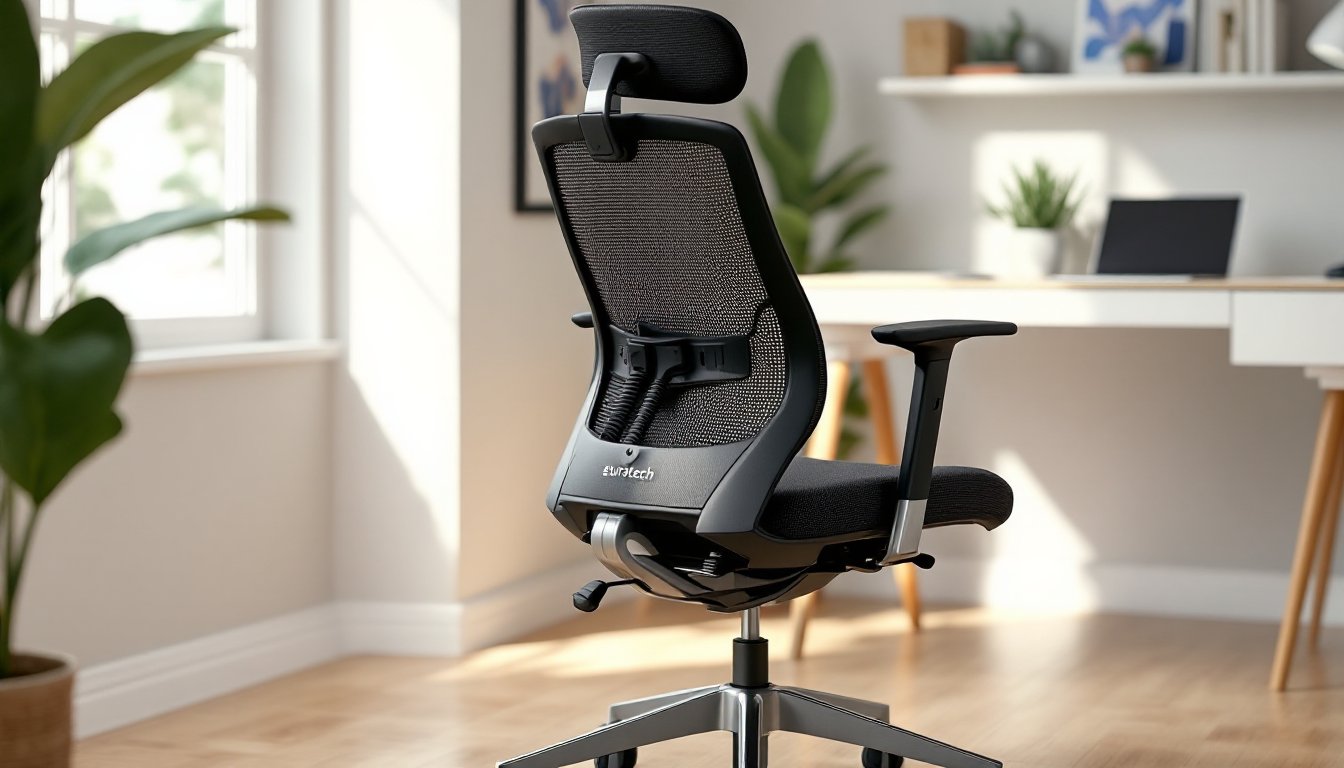
Eurotech Ergohuman (not to be confused with other Ergohuman-branded chairs) offers a high back with a headrest, making it better suited for taller users or anyone who spends time leaning back during calls. The headrest angle adjusts but doesn’t telescope up and down on all models, confirm specs before buying if you’re over 6’2″. This model typically includes a coat hanger on the back, which sounds gimmicky but is actually useful in a home office without a closet.
Eurotech Apollo series targets executive aesthetics, thicker padding, higher backs, often in black faux leather. Ergonomic adjustments are more limited compared to task chairs. Arms are usually fixed or only height-adjustable. These chairs prioritize appearance and cushioning over tweak-ability, so they’re better for users who sit upright most of the day rather than shifting postures constantly.
When comparing office furniture options, pay attention to arm style. 4D arms adjust in four directions (height, width, depth, angle) and are worth the upcharge if you type for hours daily. 2D arms adjust only height and width, adequate for most users but limiting if you need the armrests to tuck under a desk or angle outward.
Ergonomic Features That Matter
Lumbar support should hit the small of your back, roughly at belt level. Adjustable lumbar mechanisms let you move a cushion or curve up and down the backrest. Fixed lumbar designs work only if the chair’s dimensions match your torso. Sit in the chair (or check return policies) before committing, lumbar position is the #1 fit issue.
Seat depth adjustment slides the seat pan forward or backward. Critical if you’re under 5’6″ or over 6’2″. Your back should rest against the backrest with 2–3 inches of clearance behind your knees. Too much depth and you’ll perch forward, losing lumbar support. Too little and the seat edge digs into your legs.
Armrest height should let your elbows rest at roughly 90 degrees while typing, with shoulders relaxed. If armrests are too high, you’ll hunch your shoulders. Too low, and you’ll lean to one side. Many Eurotech models let you remove armrests entirely, worth considering if they interfere with desk clearance.
Tilt lock lets you fix the backrest angle instead of free-floating. Useful if you alternate between typing (upright, locked) and reading (reclined, locked at 10–15 degrees). Not all Eurotech chairs include multi-position tilt lock, some only lock in the upright position.
How to Choose the Right Eurotech Chair for Your Needs
Start with your height and weight. Manufacturers list weight capacities, but also check seat width. Most Eurotech task chairs have seat pans between 19″ and 21″ wide. If you’re broader-shouldered or prefer extra room, executive models run 21″–23″ wide but sacrifice some adjustability.
Daily hours matter more than you’d think. Spending 4–5 hours a day in a chair? Mid-range models with basic adjustments will hold up fine. Working 8+ hours, especially if you’re typing or mousing constantly? Invest in a model with 4D arms, adjustable lumbar, and seat depth control. The extra $100–$150 pays for itself in reduced shoulder and lower back strain.
Desk height influences chair selection. Standard desks sit at 28″–30″ high. If you’re using a fixed-height desk and you’re shorter than 5’7″, make sure the chair’s lowest seat height lets your feet rest flat on the floor with thighs parallel to the ground. Taller users (over 6’0″) should confirm the maximum seat height gives adequate clearance, some task chairs max out too low for long legs.
Consider flooring type. Hard flooring (hardwood, tile, laminate) works better with rollerblade-style casters or a chair mat. Standard plastic wheels can scuff or scratch over time. Carpet handles standard casters fine, but low-pile or commercial carpet may need harder wheels to roll smoothly.
Assembly on Eurotech chairs is straightforward, usually attaching the base, gas cylinder, seat, and backrest. You’ll need a Phillips screwdriver (sometimes included) and maybe an Allen wrench. Budget 20–30 minutes. Instructions are generally clear, but if hardware is missing, contact the retailer immediately. Most will overnight replacement parts rather than have you return a 40-pound box.
Eurotech chairs ship with minimal break-in time. Foam seats soften slightly over the first two weeks, and mesh backs may stretch a bit, but don’t expect dramatic changes. If something feels wrong out of the box, lumbar too high, arms too wide, adjustments or a return are your options. According to recent testing from professional review platforms, break-in periods rarely resolve fit issues that seem obvious on day one.
Setting Up and Adjusting Your Eurotech Office Chair
Assemble the chair per instructions, then adjust it before sitting down for a full workday. Initial setup takes 10 minutes and prevents a week of backache.
Step 1: Seat Height
Sit all the way back in the chair with feet flat on the floor. Thighs should be parallel to the ground or angled slightly downward. Adjust the seat height lever (usually on the right side under the seat) until this position feels natural. If your feet dangle, lower the seat. If knees are higher than hips, raise it.
Step 2: Seat Depth
If your model has a seat depth slider (often a lever under the front of the seat), adjust so there’s 2–3 inches between the seat edge and the back of your knees. Slide the seat forward if you’re shorter: backward if taller.
Step 3: Lumbar Support
Sit back fully. The lumbar cushion or curve should press into your lower back at belt level. On Eurotech chairs with adjustable lumbar, turn the knob or move the paddle until you feel firm (not painful) support. If it’s too high, it’ll push into your mid-back. Too low, and you’ll slouch.
Step 4: Armrests
Adjust arm height so your elbows rest comfortably at 90 degrees while typing. Shoulders should stay relaxed, not hunched. If your desk has a keyboard tray, arms might need to sit lower. If armrests prevent you from pulling close to the desk, adjust width (if available) or remove them.
Step 5: Tilt Tension and Lock
Locate the tilt tension knob (usually under the seat, center). Adjust so the backrest reclines with light pressure but doesn’t slam backward. Set the tilt lock to upright for typing, or unlock it if you prefer a dynamic recline. Some models have multiple lock positions, experiment to find what supports your posture.
Step 6: Headrest (if equipped)
Adjust the headrest so it supports the curve of your skull, not the middle of your head. It should cradle your head when you recline, not push it forward. Many Eurotech headrests angle but don’t extend vertically on lower-end models, if it doesn’t reach, you may need a taller chair or a separate headrest pillow.
After adjustments, sit for 15 minutes and fine-tune. Your body will tell you what’s off, tingling in thighs means seat depth or height is wrong: upper back tension means armrests are too high: lower back discomfort means lumbar needs repositioning.
Maintenance Tips to Extend Your Chair’s Lifespan
Weekly: Vacuum mesh backs and fabric seats to remove dust and crumbs. Use a soft brush attachment to avoid snagging fabric. For faux leather, wipe with a damp microfiber cloth, no harsh cleaners, which crack the finish.
Monthly: Check all adjustment knobs and levers. Tighten any that have loosened (common on tilt tension knobs). Inspect casters for hair or debris wrapped around the axles. Pull wheels off (most pop out with firm pressure) and remove buildup with scissors or a seam ripper. Dirty casters cause uneven rolling and strain the base.
Every 6 Months: Lubricate the gas cylinder and tilt mechanism with silicone spray (not WD-40, which attracts dust). Spray around the cylinder where it enters the seat mechanism, then raise and lower the seat a few times to work it in. For the tilt mechanism, spray pivot points under the seat while reclining the chair.
Inspect the base and casters for cracks. Nylon bases can develop stress fractures after years of use, especially if the chair is frequently dragged rather than rolled. If you see cracks radiating from the cylinder mount, replace the base immediately, a catastrophic failure can cause injury.
Stains on fabric: Blot (don’t rub) with a solution of mild dish soap and water. Test in an inconspicuous spot first. For set-in stains, upholstery cleaner or a mix of white vinegar and water works on most Eurotech fabrics. Avoid bleach or ammonia-based cleaners.
Mesh tears: Small snags can be secured with a dab of clear nail polish or fabric glue to prevent spreading. Larger tears typically mean replacing the backrest, check with Eurotech or third-party parts suppliers. Mesh backs are often modular and can be swapped without replacing the entire chair.
Gas cylinder sinking: If seat height drops while you’re sitting, the gas cylinder has failed. Replacement cylinders cost $20–$40 and install with basic tools. You’ll need a rubber mallet to remove the old cylinder (tap upward from below) and a pipe wrench or cylinder removal tool if it’s stuck. Many workshop project guides cover chair cylinder replacement in detail, it’s a 15-minute job once you have the part.
Storage: If storing a Eurotech chair long-term, keep it in a climate-controlled space. Extreme heat or cold can degrade foam and crack faux leather. Cover with a sheet to prevent dust accumulation, and elevate slightly off concrete floors to avoid moisture wicking into the base.
Conclusion
A well-chosen Eurotech office chair bridges the gap between flimsy big-box seating and four-figure ergonomic thrones. Focus on adjustability that matches your body and work style, not just aesthetics. Proper setup and basic maintenance will keep the chair functional for years, turning a mid-tier investment into daily comfort that actually supports productivity instead of fighting it.