If you’re assembling a home office on a budget, you’ve likely stumbled across the Kinnls office chair from Kinwai, a mid-range ergonomic option that’s caught attention for balancing affordability with adjustability. The chair promises lumbar support, breathable mesh, and a price point that doesn’t require a second mortgage. But does it hold up during eight-hour workdays, Zoom marathons, or late-night project sessions? This review walks through real-world performance, assembly quirks, and how the Kinnls stacks up against competitors in the same price bracket.
Table of Contents
ToggleKey Takeaways
- The Kinnls office chair delivers adjustable lumbar support and 3D armrests at a mid-range price point ($140–$180), features typically found in chairs $100–$150 higher.
- Breathable mesh backrest and high-density foam (50 kg/m³) provide durability and airflow superior to most budget ergonomic chairs, resisting sagging and flattening over time.
- Assembly takes 20–45 minutes with basic tools; the main setup quirk is ensuring the lumbar bracket is centered before tightening backrest bolts to avoid off-center lower back support.
- The Kinnls excels for desk work and video calls but has limitations: armrests don’t slide forward (problematic for thick desk aprons), lumbar support sits low for users over 6’2″, and cushion firmness may cause tailbone discomfort on 8+ hour shifts.
- Compared to competitors like HON Exposure and Staples Hyken, the Kinnls prioritizes adjustable lumbar support and 3D armrests over fixed features and headrests, making it ideal for customizable ergonomic fit.
What Makes the Kinnls Office Chair Stand Out?
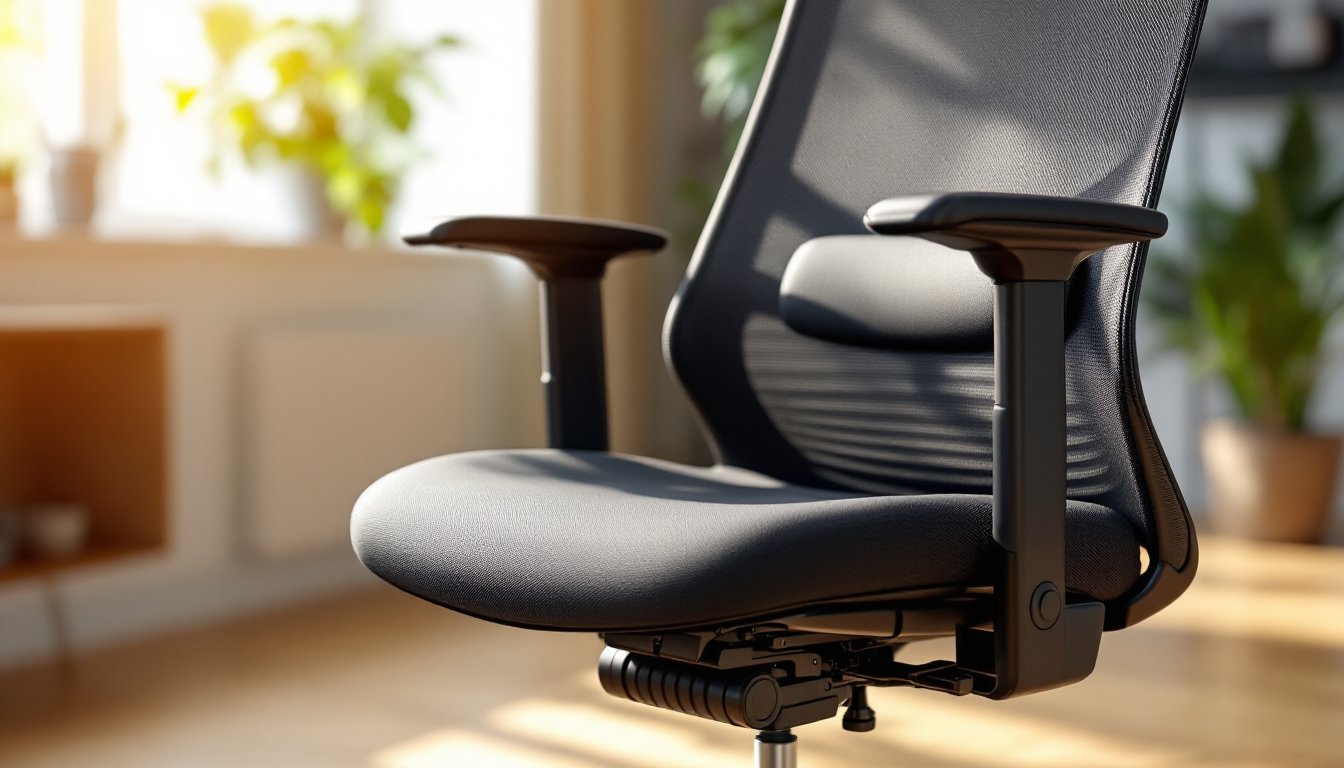
The Kinnls chair doesn’t try to compete with $800 Herman Miller clones. Instead, it targets the sweet spot between big-box store specials and premium ergonomic models. The standout feature is its adjustable lumbar support, not just a fixed cushion, but a bracket you can slide up or down along the backrest to hit your lower spine at the right height.
Another practical touch: the breathable mesh backrest that actually allows airflow. Cheaper chairs often use a thin mesh that sags within months, but the Kinnls employs a tighter weave with reinforced edges. The seat cushion uses high-density foam rated at 50 kg/m³, which is firmer than most budget chairs and resists the dreaded pancake effect after six months of use.
The chair also includes 3D armrests, adjustable in height, width, and angle. That’s a feature often reserved for chairs $100–$150 higher. For DIYers setting up a workbench-turned-desk or unconventional workspace, that extra adjustability matters when you’re working around uneven surfaces or retrofitted furniture.
One less common detail: the base is nylon with reinforced ribs, not pure plastic. It’s rated for 300 pounds, which is honest weight capacity rather than the optimistic numbers some brands throw around. The casters are 2-inch polyurethane wheels, quiet on hardwood and softer than the standard PVC options that scratch floors.
Key Features and Specifications
Here’s what you’re working with out of the box:
Materials:
- Backrest: Breathable mesh (polyester blend)
- Seat cushion: High-density foam, 3 inches thick
- Frame: Steel with powder-coat finish
- Base: Reinforced nylon, 27-inch diameter
- Casters: Dual-wheel polyurethane (2-inch)
Adjustability:
- Seat height: 17.5 to 21.5 inches (pneumatic lift)
- Armrests: 3D adjustable (height, width, pivot)
- Lumbar support: Sliding bracket, adjustable 3 inches vertically
- Tilt tension: Adjustable knob under seat
- Tilt lock: 3 positions (upright, slight recline, full recline)
Dimensions:
- Seat width: 20 inches
- Seat depth: 19.5 inches
- Backrest height: 25 inches
- Overall height (max): 46 inches
Weight capacity: 300 pounds (manufacturer spec)
Warranty: 2 years on frame and mechanical parts, 1 year on upholstery
Ergonomic Design and Comfort Level
The Kinnls doesn’t reinvent ergonomic design, it executes the basics well. The lumbar bracket hits the L4–L5 vertebrae for most users between 5’4″ and 6’2″, though taller folks may find it sits a bit low even at max height. The foam seat has a waterfall edge (slightly rounded front) to reduce pressure on the backs of your thighs, which matters during long stretches at the desk.
The backrest recline goes to about 120 degrees, which is enough for a quick stretch but not a nap-worthy lean. The tilt tension knob offers good resistance, firmer than most budget chairs, so you won’t feel like you’re tipping backward unexpectedly. If you’re used to a fixed-back task chair, this takes a day or two to dial in.
One comfort quirk: the armrests don’t telescope forward or backward, only pivot inward. That’s fine for typing posture, but if you like to pull close to a desk with thick aprons or keyboard trays, they might hit before you’re seated comfortably. A workaround: remove the armrests entirely (four hex bolts each) if your desk height allows elbow support without them.
Assembly and Setup Process
Assembly is straightforward but not tool-free. Budget 20–30 minutes if you’ve put together flat-pack furniture before, closer to 45 if this is your first rodeo. The box includes an Allen wrench and all necessary bolts, but you’ll want a Phillips screwdriver on hand for the seat plate (the included wrench works but is slow).
Step-by-step breakdown:
- Attach the base and casters. Press the five casters into the nylon base, they snap in with firm pressure, no tools needed.
- Install the gas lift cylinder. Drop the cylinder into the center hole of the base. No fasteners required: it’s friction-fit.
- Bolt the seat plate to the seat cushion. Four bolts, pre-drilled holes. This is where a power screwdriver saves time.
- Attach the backrest to the seat bracket. Line up the bracket behind the seat, then secure with six bolts. The lumbar support bracket slides onto the backrest before this step, don’t skip it or you’ll backtrack.
- Mount the armrests. Four bolts per side. The armrests are labeled L and R: reversing them won’t cause structural issues but the pivot angle will feel backward.
- Drop the seat assembly onto the gas lift. Align the mechanism plate over the cylinder and press down with your body weight. It clicks into place.
- Adjust and test. Before sitting fully, check that all bolts are snug. The tilt mechanism arrives in the unlocked position, so engage the lock lever before testing recline.
Common assembly hiccup: The lumbar bracket can slide crooked if you don’t center it before tightening the backrest bolts. If your lower back support feels off-center after assembly, loosen the backrest bolts, adjust, and retighten.
The chair ships with a plastic seat cover and foam edge guards, remove those before declaring the cushion uncomfortable. Some budget-friendly ergonomic options arrive with protective packaging that feels like part of the chair if you rush.
Performance for Different Work Scenarios
Desk work and typing: The Kinnls excels here. The mesh backrest keeps airflow moving, which matters in home offices without dedicated HVAC. The 3D armrests support forearms during long typing sessions, reducing shoulder creep. The seat height range works well with standard 29-inch desk height, leaving thighs parallel to the floor for most users.
Video calls and meetings: The backrest doesn’t squeak during minor shifts, a real win for Zoom-heavy schedules. The recline lock holds position without creaking, so you’re not the person whose chair sounds like a rusty gate every time you lean back.
Drawing, drafting, or detail work: The armrests pivot inward enough to get close to a drafting table or large monitor, though they don’t drop low enough to slide fully under desks with aprons thicker than 2 inches. If you’re working at a workbench converted to a desk, you may need to remove the armrests or adjust desk height.
Long shifts (8+ hours): The high-density foam holds up better than budget chairs, but it’s not memory foam. After six or seven hours, you’ll feel the firmness. If you’re prone to tailbone discomfort, a gel seat cushion (½-inch thickness) can extend comfort without throwing off the seat height calibration.
Gaming or leisure use: The recline is comfortable for casual use but not aggressive enough for gaming marathons. The tilt tension is adjustable but maxes out at moderate resistance, if you like to rock back and forth, it’ll feel loose compared to purpose-built gaming chairs.
Users in home office setups report the chair holds up well in mixed-use environments, especially when paired with height-adjustable desks or DIY workstations.
Pros and Cons of the Kinnls Office Chair
Pros:
- Adjustable lumbar support that actually moves, not a fixed cushion
- 3D armrests at a price point where most competitors offer fixed or 1D arms
- Breathable mesh that doesn’t sag quickly
- High-density foam seat resists flattening better than typical budget chairs
- Honest weight capacity (300 lbs) with a reinforced base
- Quiet casters suitable for hardwood and laminate floors
- Tool-friendly assembly, no proprietary fasteners or missing hardware
Cons:
- Armrests don’t slide forward/back, limiting fit under desks with thick aprons
- Lumbar bracket sits low for taller users (over 6’2″)
- Seat cushion is firm, comfortable for posture, less so for all-day softness
- Recline maxes out at 120 degrees, not ideal for deep-lean breaks
- Tilt tension tops out at moderate resistance, may feel loose for heavier users who prefer a stiffer lock
- Nylon base isn’t as durable as aluminum (expect scuffs after a year of regular use)
- No headrest, even as an add-on option
Safety and durability notes: The gas lift is BIFMA-certified, meaning it meets voluntary safety standards for office seating. The chair passed a 1,000-cycle tilt test during third-party evaluation, which translates to roughly 2–3 years of regular use before mechanisms may loosen. Keep the adjustment knobs snug, vibration from rolling or rocking can loosen bolts over time.
How It Compares to Similar Office Chairs
Kinnls vs. HON Exposure (mesh task chair): The HON offers a similar mesh backrest but fixed armrests and no adjustable lumbar bracket. The Kinnls wins on adjustability, though the HON’s wider seat (21 inches) suits larger frames better. Price-wise, they’re within $20–$30 depending on sales.
Kinnls vs. AmazonBasics High-Back Executive Chair: The AmazonBasics uses bonded leather and foam throughout, more padding, less breathability. It’s quieter out of the box but the upholstery peels within 12–18 months. The Kinnls’ mesh sidesteps that durability issue but sacrifices the plush feel.
Kinnls vs. Staples Hyken (mesh chair): The Hyken includes a headrest and slightly deeper recline (125 degrees), but the lumbar support is fixed. If you need neck support and don’t mind non-adjustable lumbar, the Hyken edges ahead. If lower back fit is your priority, the Kinnls adjustable bracket is the better pick.
Kinnls vs. DIY office seating: For the handy, building a custom desk chair from scratch is ambitious but possible. Platforms like Ana White offer plans for wooden desk chairs and benches, but adding ergonomic mechanisms (gas lifts, tilt brackets) requires sourcing parts separately and isn’t cost-effective unless you’re repurposing salvaged components. The Kinnls delivers factory-tested ergonomics for less than the cost of quality casters and a gas lift mechanism bought individually.
Price positioning: At the time of this review (April 2026), the Kinnls typically retails between $140–$180, depending on retailer and promotions. That’s competitive with mid-tier task chairs but about $50–$70 more than bare-bones models. The added cost buys you the lumbar adjustability and 3D armrests, features that matter if you’re clocking serious desk hours.