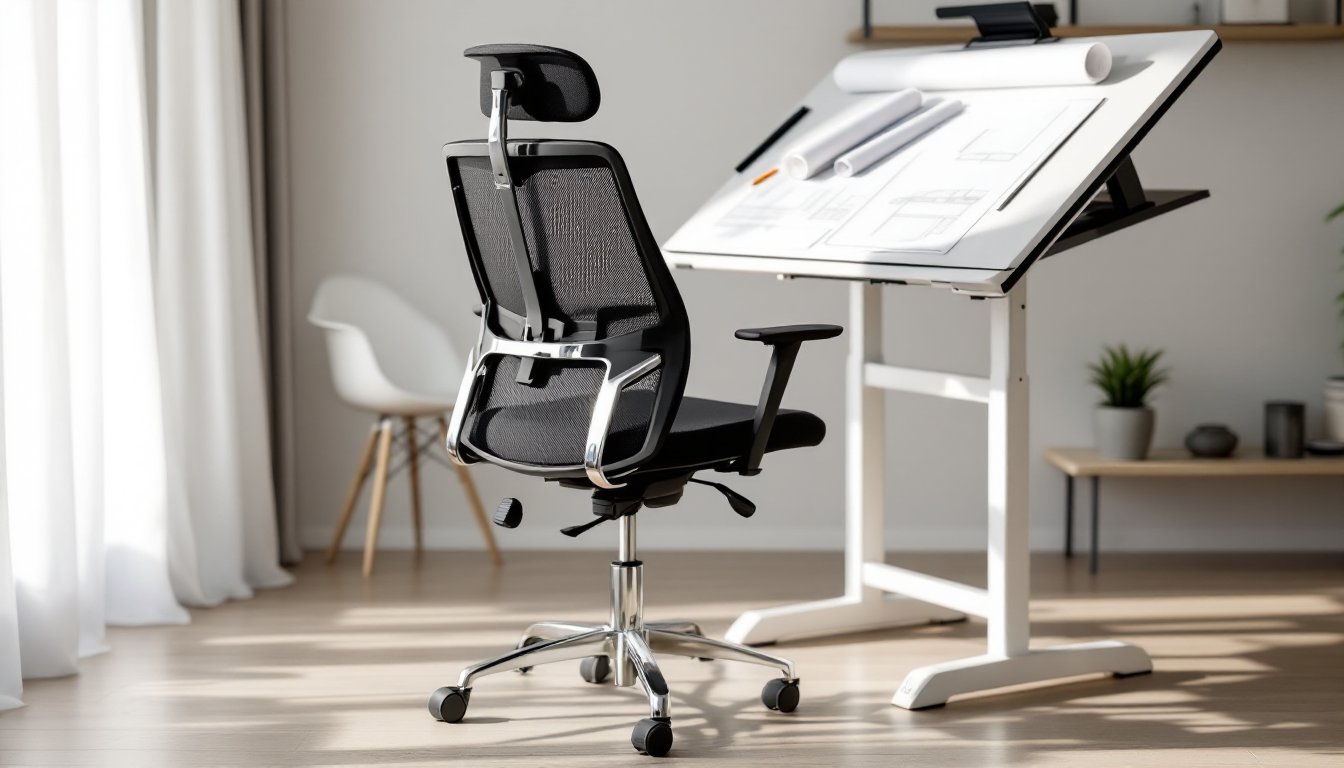
Whether you’re sketching architectural plans, working at a standing desk, or spending hours at a high-top workbench, standard office chairs leave your feet dangling and your posture suffering. A drafting office chair solves these problems with a taller seat height, built-in footring, and ergonomic adjustments designed for elevated work surfaces. These aren’t just for architects anymore, artists, lab technicians, designers, and anyone working at heights above a typical 29-30-inch desk can benefit from the support and stability a drafting chair provides.
Table of Contents
ToggleKey Takeaways
- A drafting office chair features an extended pneumatic cylinder, footring support, and ergonomic adjustments designed for work surfaces higher than standard desks, making it essential for architects, artists, lab technicians, and home office workers using standing desks.
- Proper seat height positioning should place your elbows at approximately 90 degrees with the work surface 1-2 inches below elbow height, preventing lower back pain and circulation issues caused by dangling feet during extended work periods.
- Look for drafting chairs with gas lift cylinders rated for 250-300 pounds minimum, high-density foam cushioning (1.8 lb/ft³ density), and five-star bases measuring at least 26-28 inches in diameter for stability and durability.
- Adjustable lumbar support and seat depth adjustment are critical ergonomic features that accommodate different body types and prevent cumulative strain during extended elevated work sessions.
- A drafting office chair’s versatility across workspace configurations—adapting to standing desks, drafting tables, and traditional workstations—makes it a valuable long-term investment that protects your seating solution across 5-10 years of evolving work needs.
What Is a Drafting Office Chair and Who Needs One?
A drafting office chair is a specialized seating option built for work surfaces higher than standard desk height. Think drafting tables (typically 36-48 inches), lab benches, standing desks, or workshop counters. The defining feature is an extended pneumatic cylinder that allows seat height adjustment typically ranging from 24 to 34 inches off the ground, compared to 16-21 inches for standard office chairs.
Most drafting chairs include a footring (also called a footrest), a circular or D-shaped metal loop positioned around the base. This supports your feet when they can’t comfortably reach the floor, preventing circulation issues and lower back strain that come from legs dangling for extended periods.
Who actually needs one? Architects and engineers are the obvious candidates, but the list extends further. Artists working at easels or tilted tables, lab technicians at raised benches, seamstresses at cutting tables, jewelers at high workstations, and even home office workers using adjustable standing desks all benefit from proper elevated seating. If your work surface sits above 32 inches and you’re there for more than an hour at a stretch, a drafting chair isn’t a luxury, it’s a practical necessity for maintaining proper posture and preventing fatigue.
Key Features That Set Drafting Chairs Apart
Adjustable Height and Footring Support
The extended gas lift cylinder is the mechanical heart of any drafting chair. Standard office chairs max out around 21 inches of seat height: drafting models start where those end. Look for a cylinder rated for 250-300 pounds minimum, cheaper cylinders fail faster under the increased leverage created by higher seat positions.
The footring placement matters more than most shoppers realize. It should sit approximately 8-10 inches below the seat when adjusted to your working height, allowing your knees to bend at roughly 90 degrees with feet resting comfortably. Fixed-height rings work if you’re the sole user and know your ideal measurement. Adjustable rings add $30-60 to the cost but accommodate multiple users or changing desk configurations.
Footring diameter typically ranges from 18 to 21 inches. Wider rings offer more foot positioning options but can interfere with chair bases on smaller models. The ring itself should be chrome-plated steel or powder-coated metal, plastic rings crack under repeated use. Some premium models feature contoured or cushioned footrings, though these aren’t necessary for most users.
Ergonomic Design for Extended Use
Spending six hours perched at a drafting table exposes every ergonomic weakness in a chair. Lumbar support becomes critical, look for adjustable lumbar mechanisms that move up and down at least 2-3 inches to match your spine’s natural curve. Fixed lumbar pads only work if they happen to align with your specific back shape, which is hit-or-miss.
Seat depth adjustment (sometimes called seat slide) lets users move the seat pan forward or backward by 2-4 inches. This matters because taller individuals working at elevated surfaces often have proportionally longer thighs. A seat that’s too deep forces you to slouch forward or leave a gap behind your back: too shallow and you lose thigh support. When creating a productive home office setup, proper ergonomics prevent cumulative strain.
Armrests on drafting chairs are controversial. Some users need them for posture support: others find they interfere with getting close to drafting tables or wide work surfaces. If you opt for arms, choose height-adjustable and width-adjustable models that swing out of the way. Fixed-position arms on a tall chair often hit desk edges or force awkward reaching positions. Many professionals who incorporate thoughtful office design principles skip armrests entirely on drafting chairs to maximize workspace access.
Seat cushioning should use high-density foam (minimum 1.8 lb/ft³ density rating) or molded mesh. Low-density foam feels soft initially but compresses into a hard pancake within 6-12 months. Mesh seats offer better ventilation, worth considering if your workspace lacks good airflow, but provide less cushioning for bony builds.
How to Choose the Right Drafting Chair for Your Home Office
Start by measuring your work surface height. Grab a tape measure and check the distance from floor to the top of your desk, table, or counter. For comfortable typing or writing posture, your elbows should bend at approximately 90 degrees with shoulders relaxed. This typically means seat height should position you so the work surface is 1-2 inches below elbow height when seated.
Next, calculate your required seat height range. Sit in your current chair at a standard desk (around 29 inches high) and measure from the floor to the bend of your knee. That’s your baseline. If your drafting table is 10 inches higher than a standard desk, you’ll need roughly 10 inches more seat height. Add a 3-4 inch buffer for adjustment flexibility.
Weight capacity matters more on drafting chairs than standard models due to the extended cylinder. Most budget models (under $200) rate for 225-250 pounds. Mid-range options ($200-400) typically handle 275-300 pounds. If you’re near the stated limit, go one tier higher, cylinders operating at maximum capacity wear out faster and become safety hazards.
Base construction affects stability significantly. Look for a five-star base measuring at least 26-28 inches in diameter. Smaller bases create tip-over risks when you’re seated high and lean to reach something. Metal bases (steel or aluminum) outlast plastic, though quality nylon bases work fine for users under 200 pounds. Many DIY enthusiasts researching projects on sites like Instructables appreciate chairs with accessible parts for eventual repairs or modifications.
Casters need consideration based on your flooring. Hard casters (typically plastic or nylon) work for carpet: they roll freely on the soft surface. Soft casters (rubber or polyurethane) suit hard floors (wood, tile, laminate) without scratching or causing excessive rolling. Using the wrong type makes the chair either too sticky or too slippery. Most chairs ship with one type, but universal replacement casters cost $15-25 for a set of five.
Warranty coverage reveals manufacturer confidence. Expect at least 3 years on the gas cylinder and 5 years on the frame and base for chairs over $250. Budget models often provide 1-2 years total. Pay attention to what’s excluded, many warranties don’t cover upholstery wear, caster damage, or issues from exceeding weight limits.
Top Benefits of Using a Drafting Chair in Your Workspace
The most immediate benefit is proper posture at elevated work surfaces. When your feet dangle without support, hip flexors tighten, the pelvis tilts backward, and lumbar spine flattens, all leading to lower back pain within 45-90 minutes. A properly adjusted drafting chair with footring support maintains the natural S-curve of your spine, distributing pressure across the seat and backrest instead of loading it onto your lumbar discs.
Circulation improves noticeably. Dangling legs allow blood to pool in the lower extremities, causing that pins-and-needles sensation or visible swelling by end of day. The footring provides a surface to shift weight between your feet and seat, keeping blood moving and reducing end-of-day leg fatigue.
Versatility across workspace configurations makes drafting chairs particularly valuable in home offices with multiple work zones. Many creative professionals maintain both a standard computer desk and a standing-height work surface for different tasks. A drafting chair transitions between these spaces more effectively than keeping two separate seating solutions. Design-focused individuals browsing inspiration on platforms like Design Milk often appreciate the clean, professional aesthetic drafting chairs bring to modern workspaces.
Productivity gains come from reduced transition time. If you’re constantly moving between seated and standing positions at an adjustable desk, a drafting chair eliminates the need to lower your desk each time you sit. Just pull up the chair, rest your feet on the ring, and continue working. This seamless workflow particularly benefits people doing detailed work requiring frequent posture changes.
Longevity in changing work environments shouldn’t be overlooked. Standard office chairs become obsolete if you upgrade to a standing desk or reconfigure your workspace. Drafting chairs adapt to these changes, protecting your investment over 5-10 years of evolving workspace needs. The initial cost premium ($100-200 more than comparable standard chairs) spreads across years of multi-purpose use.
Accessibility for users with specific physical needs rounds out the benefits. Individuals with hip or knee issues sometimes find elevated seating with footring support easier to get in and out of than low-slung office chairs. The higher seat position requires less joint flexion during the sit-to-stand transition, reducing strain on compromised joints. Homeowners exploring resources on Houzz for workspace accessibility modifications frequently discover drafting chairs as part of ergonomic solutions.
Conclusion
Choosing a drafting office chair comes down to matching seat height range to your work surface, prioritizing build quality over cosmetic features, and ensuring ergonomic adjustments fit your body and work style. Measure first, calculate weight capacity with a safety margin, and don’t skimp on the gas cylinder quality. Whether you’re setting up a dedicated drafting station or adapting a flexible home office, the right chair turns elevated work from a strain into a sustainable, comfortable practice.